Desensitization Glossary
The Desensitization Glossary protects sensitive information in documents. When translating documents containing confidential content, the system replaces sensitive terms with placeholders before sending to the LLM for translation. After translation, the placeholders are restored to the original content — ensuring sensitive data is never exposed to external models.
Workflow example:
Original text with sensitive content → Desensitization replacement → Send to LLM for translation → Restore sensitive content → Final translation output
For example, if a document contains the email address zhangsan@company.com, the system first replaces it with the placeholder [EMAIL_1] before sending to the model. After translation, [EMAIL_1] is restored to zhangsan@company.com — the email address never passes through the external model.
Create a Desensitization Glossary
Go to the Translation Assistant's Custom Glossary page. Click the Glossary Reference Table panel on the right, switch to the Desensitization Glossary tab, click New, enter a glossary name, and click Confirm.
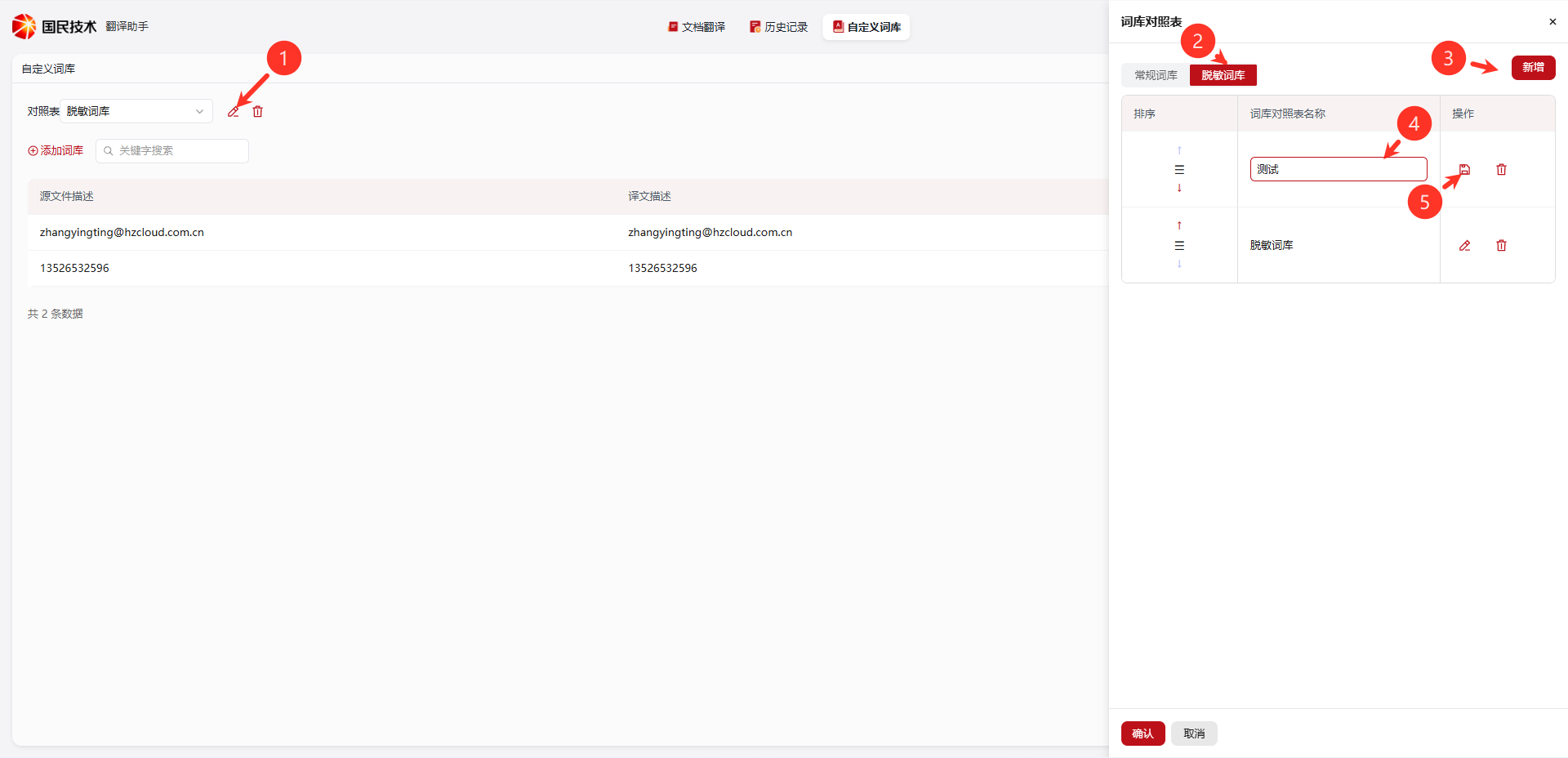
Page operation reference:
| Label | Action | Description |
|---|---|---|
| ① | Edit / Delete | Rename or delete the currently selected glossary |
| ② | Desensitization Glossary Tab | Switch to the desensitization glossary list, managed separately from regular glossaries |
| ③ | New | Create a new desensitization glossary |
| ④ | Glossary Name Input | Enter the new glossary name, e.g., Test, Desensitization Glossary |
| ⑤ | Save / Delete | Save the current glossary name or delete the glossary |
Add Desensitization Terms
After creating the glossary, click Add Glossary, fill in the sensitive content to replace and its corresponding placeholder description, then click confirm.
Terms are displayed as a table:
| Field | Description |
|---|---|
| Source Description | Sensitive content to be replaced, e.g., email zhangsan@company.com, phone 13800138000 |
| Translation Description | The restored content after translation (usually the same as the source; used during the restoration phase) |
Note: The "Translation Description" in a Desensitization Glossary is the content to restore after translation — different from a Corpus glossary, which specifies the target translation. The Desensitization Glossary protects the original content from being processed by the model.
Use Cases
| Scenario | Example |
|---|---|
| Email addresses | zhangsan@company.com → placeholder → translate → restore |
| Phone numbers | 13800138000 → placeholder → translate → restore |
| Internal codes | Project codes, contract numbers, or other content you don't want the model to recognize |
| Names / Organizations | Confidential personnel names or organization names |
Tip: The Desensitization Glossary and Corpus can be used simultaneously. The system first performs desensitization replacement, then translation, then restores sensitive content — three steps executed automatically in sequence.