Temporary Knowledge Base Node
Overview
The Temporary Knowledge Base node dynamically receives files uploaded by users during a conversational workflow, and performs real-time indexing and retrieval on them. Unlike a private knowledge base, the temporary knowledge base only takes effect within the current conversation session — it is not persisted and does not affect existing historical file indexes.
Key Features
| Feature | Description |
|---|---|
| Session Isolation | Not affected by historical files; each initialization starts fresh without re-indexing old files |
| Dynamic Indexing | When a user uploads a file mid-conversation and continues asking questions, the system automatically triggers indexing for the new file |
| Requires Private Knowledge Base | Must first connect to a private knowledge base and add the temporary knowledge base within it before use |
| Output Restriction | The output variable cannot be connected directly to a Model node; it must go through a Knowledge Base retrieval node first |
| Image Parsing | Supports parsing image content within files; requires configuring an image processing model and analysis prompt |
Prerequisites
- A private knowledge base has been created and configured
- The temporary knowledge base has been enabled and added in the private knowledge base settings
- The Temporary Knowledge Base node in the workflow is connected to the private knowledge base node
Node Configuration
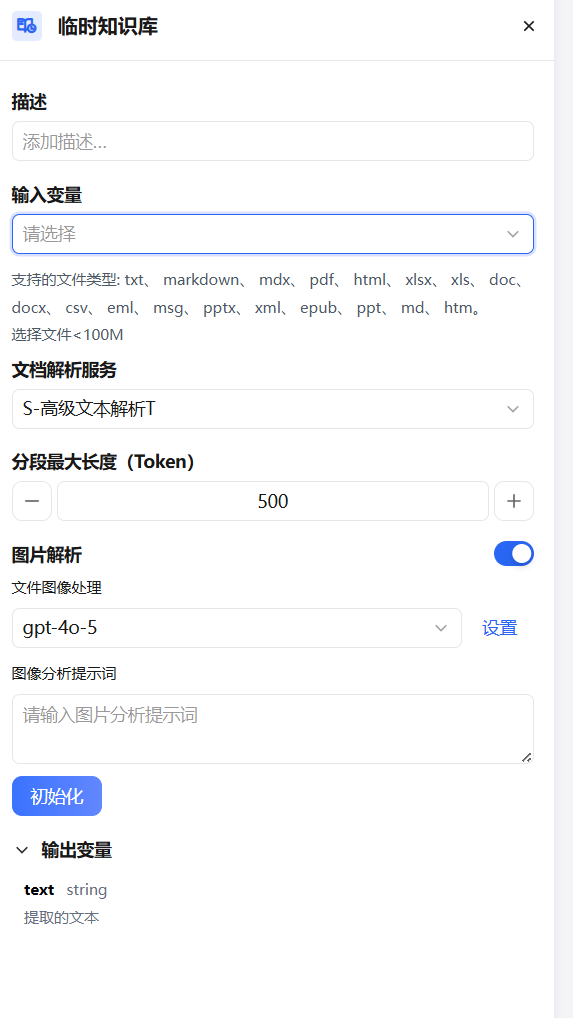
Description
Add a note to the current node for easier maintenance and collaboration.
Input Variable
Select the file variable passed from an upstream node as the source for this indexing operation.
Supported file types:
txt, markdown, mdx, pdf, html, xlsx, xls, doc, docx, csv, eml, msg, pptx, xml, epub, ppt, md, htm
Single file size limit: < 100 MB
Document Parsing Service
Select the service engine for parsing document content. The default is S-Advanced Text Parser T, suitable for most document formats and providing higher-quality text extraction.
Max Segment Length (Tokens)
Sets the maximum token count per segment when indexing the document. Default is 500.
- Smaller values → finer retrieval granularity, suitable for precise Q&A
- Larger values → more complete context retention, suitable for paragraph-level understanding
- Adjust using the
−/+buttons or enter a value directly
Image Parsing
When enabled, the system recognizes and analyzes image content within files — suitable for files containing charts, screenshots, or other non-text content.
| Setting | Description |
|---|---|
| File Image Processing | Select the model for image understanding; default is gpt-4o-5. Click Settings to configure model parameters |
| Image Analysis Prompt | Enter a prompt to guide the model in analyzing images, e.g., "Please describe the data table content in this image" |
Image parsing is enabled by default. If the file contains no images or image understanding is not needed, disable it to save processing resources.
Initialization
Click the Initialize button to build the index for the files in the current input variable. After initialization, downstream Knowledge Base retrieval nodes can search based on the file content.
Each conversation requires re-initialization. The index from the previous session is not retained.
Output Variable
| Variable | Type | Description |
|---|---|---|
text | string | Text content extracted from the uploaded file |
The output variable
textcannot be connected directly to a Model node. It must first be processed by a Knowledge Base retrieval node, and the retrieval results are then passed to the Model node.
Typical Use Cases
Instant Q&A After File Upload
The user uploads a PDF or Word document mid-conversation. The temporary knowledge base indexes the file content in real time, and subsequent questions can be answered based on that document — no pre-loading required.
Session-level Private File Analysis
Suitable for analyzing private files uploaded by the user in the current session. File content is only available during this session and is not retained afterward, protecting data privacy.
Intelligent Parsing of Files with Charts
For files containing images, charts, or screenshots (e.g., PPT, scanned PDFs), enabling image parsing allows the system to use a vision model to understand image content, enabling complete retrieval of mixed text and image content.
Notes
- The output variable cannot be connected directly to a Model node — process it through a Knowledge Base retrieval node first
- Each conversation initialization starts with an empty temporary knowledge base; files from the previous session are not loaded
- If the user uploads multiple files in the same conversation, each upload triggers a new indexing process
- When image parsing is enabled, ensure the image processing model is correctly configured; otherwise image content cannot be recognized
- File size must be under 100 MB; files exceeding this limit cannot be indexed