Variable Assignment Node
Definition
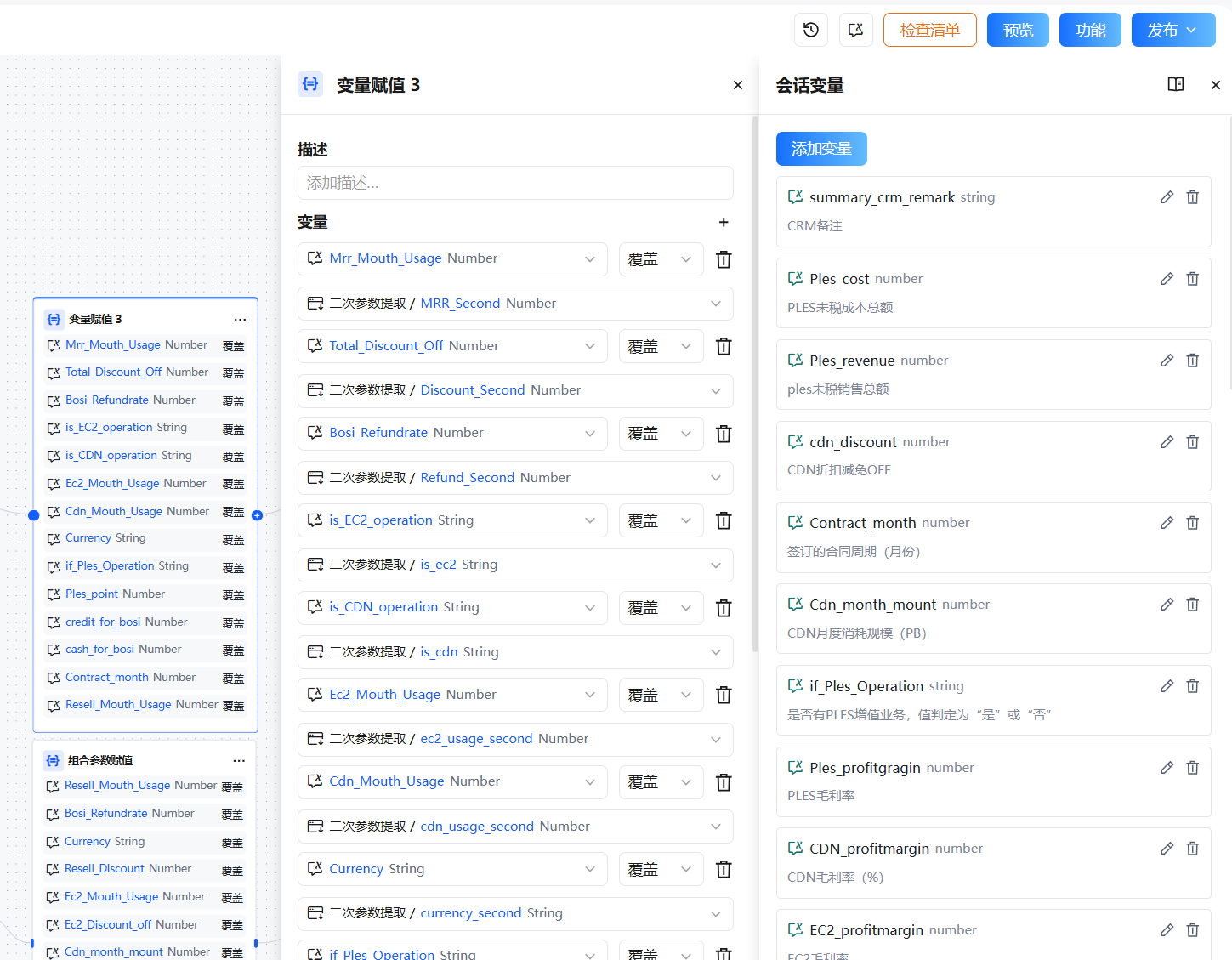
The Variable Assignment node writes values to writable variables. Currently supported writable variable types:
- Session variables
- Loop variables
Using this node, you can write the output of any node in a conversational workflow into a session variable to persist state across conversation turns, or dynamically update loop variables within a Task Loop.
Configuration
Basic Settings
| Setting | Description |
|---|---|
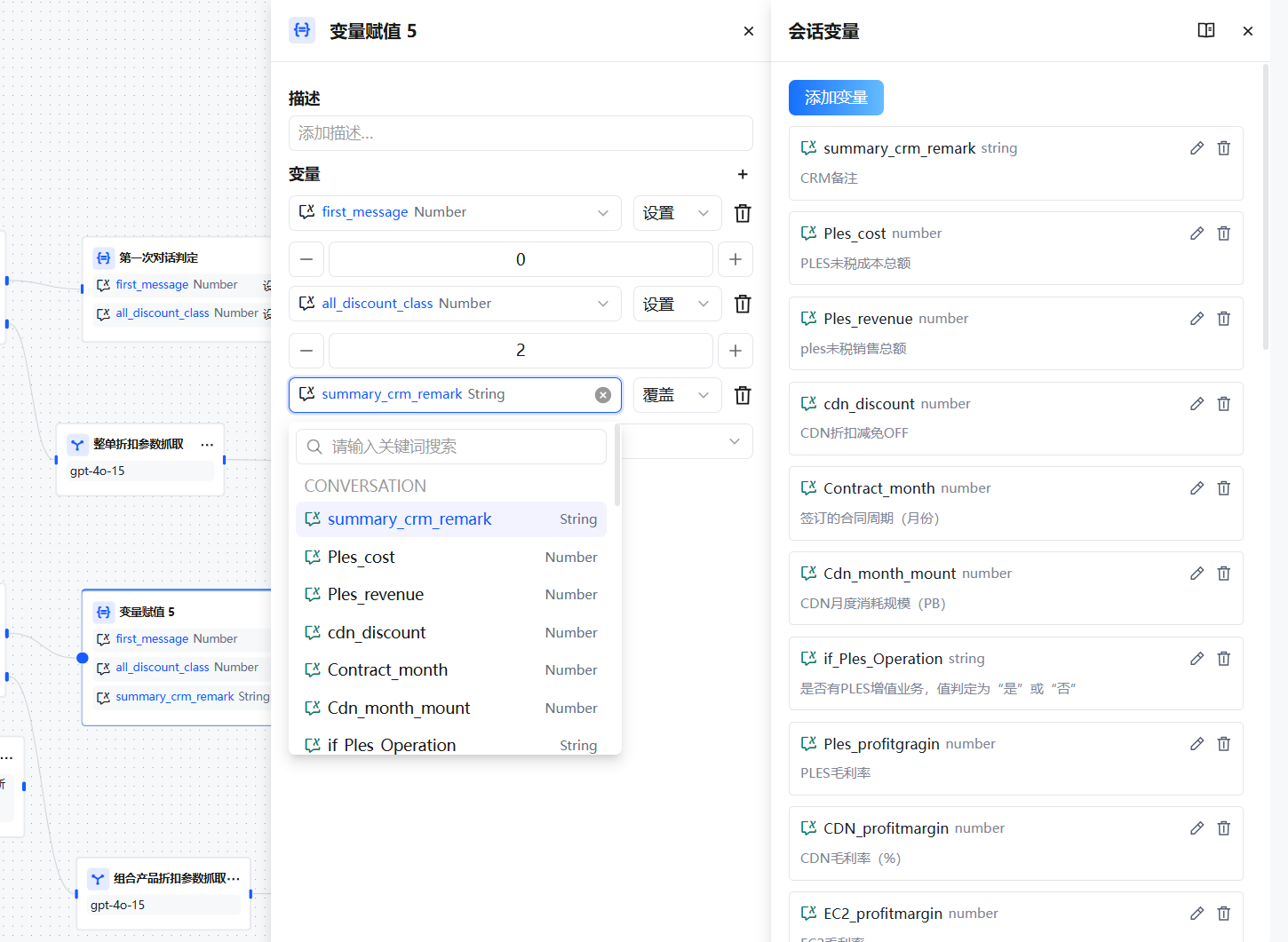
| Assignment Target | Select the variable to write to; supports session variables and loop variables |
| Assignment Source | Select an output variable from an upstream node, or enter a fixed value directly |
| Assignment Mode | Overwrite (replace the current value) or Append (concatenate to the end; String/Array types only) |
Assignment Modes
| Mode | Applicable Types | Description |
|---|---|---|
| Overwrite | All types | Completely replace the variable's current value with the new value |
| Append | String, Array | Concatenate the new value to the end of the variable without clearing existing content |
For Array variables, Append pushes the new element to the end of the array. For String variables, Append concatenates the new string directly after the existing string.
Write Modes by Variable Type
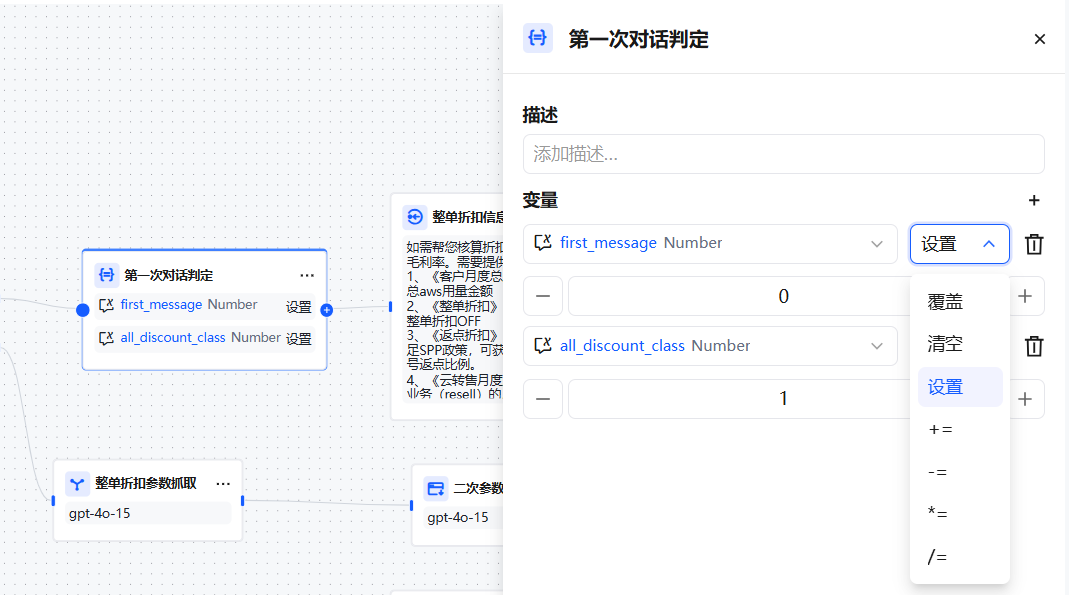
The target variable's data type determines the available write modes:
String target:
- Overwrite — Replace the variable with the source value
- Clear — Empty the variable's content
- Set — Manually specify a value without a source variable
Number target:
- Overwrite — Replace the variable with the source value
- Clear — Empty the variable's content
- Set — Manually specify a value
- Arithmetic — Perform
add,subtract,multiply, ordivideon the target variable
Object target:
- Overwrite — Replace the variable with the source value
- Clear — Empty the variable's content
- Set — Manually specify a value
Array target:
- Overwrite — Replace the variable with the source value
- Clear — Empty the variable's content
- Append — Add a new element to the array
- Extend — Add a new array to the target array (add multiple elements at once)
Typical Use Cases
Record User Preferences Across Turns
Requirement: The user states a language preference in the first turn (e.g., "Please reply in English"). All subsequent turns must follow this preference.
Setup:
- Create a session variable
language_preference(String type, default empty) in the application - Use a Parameter Extraction node to extract the preference from user input
- Use a Variable Assignment node to write the result to
language_preference(mode: Overwrite) - Reference
{conversation.language_preference}in the Model node's system prompt
Start → Parameter Extraction (extract language_preference)
      → Variable Assignment (write to session variable)
      → Model Node (prompt references preference variable)
      → Direct Reply
Dynamically Update Loop Variables in a Task Loop
Requirement: In a Task Loop, write intermediate results back to the loop variable after each iteration for use in the next iteration's logic.
Setup:
- Task Loop node receives array input; loop variable is
item - Sub-flow processes
itemvia a Code or Model node - Use a Variable Assignment node to write the result back to the loop variable (mode: Overwrite)
- Subsequent sub-flow nodes reference the updated loop variable
Store File References for Reuse
Requirement: After a user uploads a file, multiple branches in the workflow need to access it — avoid passing it repeatedly.
Setup:
- Create a session variable
uploaded_file(File type) - At the start of the conversation, use a Variable Assignment node to write the uploaded file to
uploaded_file - Any subsequent node can reference the file via
{conversation.uploaded_file}
FAQ
Q: Can downstream nodes in the same turn immediately read the new value after assignment?
Yes. Once assigned, all subsequent nodes in the same workflow execution chain can read the latest value.
Q: When does a session variable's default value take effect?
Only when the variable has never been assigned. Once a value has been written via the Variable Assignment node, the default value no longer applies — unless you explicitly reset the variable to its default.
Q: Can one Variable Assignment node assign multiple variables at once?
Yes. A single Variable Assignment node can be configured with multiple assignment rules, executed in order.