Code Execution Node
Overview
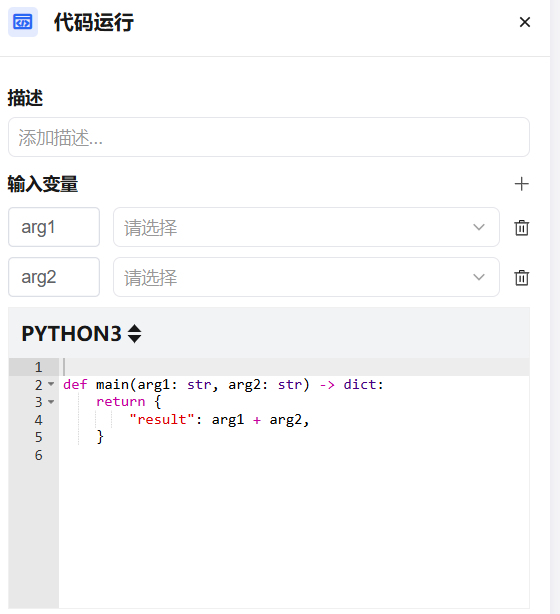
The Code Execution node lets you run Python or NodeJS code directly within a workflow to implement custom data processing logic. Compared to other nodes, it offers greater flexibility for complex data transformation, calculation, or formatting tasks — without relying on external services.
Supported Runtimes
| Runtime | Best For |
|---|---|
Python 3 | Data processing, math calculations, text manipulation |
NodeJS | JSON processing, string operations, async logic |
Configuration
| Setting | Description |
|---|---|
| Runtime | Select the execution environment: Python 3 or NodeJS |
| Input Variables | Variables referenced from upstream nodes, passed as input parameters. Supports dropdown search |
| Code Editor | Write custom processing logic; must include a main function as the entry point |
| Output Variables | Define the field names and types returned after code execution |
Code Entry Convention
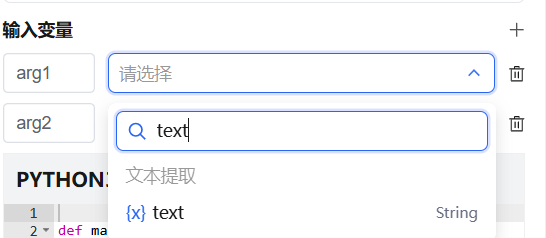
The code node requires a main function as the entry point. Input variables are passed as parameters, and the return value must be a dictionary (Python) or object (NodeJS).
Python example:
def main(input_text: str) -> dict:
    result = input_text.strip().upper()
    return {
        "output": result,
        "length": len(result)
    }
NodeJS example:
async function main({ inputText }) {
    const result = inputText.trim().toUpperCase();
    return {
        output: result,
        length: result.length
    };
}
Typical Use Cases
Arithmetic
Perform addition, subtraction, multiplication, division, modulo, or exponentiation on values from upstream nodes.
def main(price: float, quantity: int, discount: float) -> dict:
    subtotal = price * quantity
    total = subtotal * (1 - discount)
    return {
        "subtotal": subtotal,
        "total": round(total, 2)
    }
JSON Transform
Extract fields, restructure, or normalize complex JSON data for downstream nodes.
import json

def main(raw_json: str) -> dict:
    data = json.loads(raw_json)
    return {
        "name": data.get("user", {}).get("name", ""),
        "email": data.get("user", {}).get("contact", {}).get("email", ""),
        "is_active": data.get("status") == "active"
    }
Text Processing
Clean, split, join, or regex-match strings for formatted output or keyword extraction.
import re

def main(raw_text: str) -> dict:
    cleaned = re.sub(r'\s+', ' ', raw_text).strip()
    words = cleaned.split(' ')
    return {
        "cleaned_text": cleaned,
        "word_count": len(words),
        "preview": cleaned[:100]
    }
Date & Time Formatting
Convert timestamps or non-standard date strings to a unified format.
from datetime import datetime

def main(timestamp: int) -> dict:
    dt = datetime.fromtimestamp(timestamp / 1000)
    return {
        "formatted": dt.strftime("%Y-%m-%d %H:%M:%S"),
        "date_only": dt.strftime("%Y-%m-%d"),
        "year": dt.year
    }
Security Policy
Execution Isolation
Code runs in a sandboxed environment. Each execution is an independent process that is automatically destroyed after completion — no state is retained.
Restricted Capabilities
| Restriction | Reason |
|---|---|
| File system access | Not allowed — prevents data leakage |
| Network requests | Not allowed — use the HTTP Request node instead |
| System commands | os.system, subprocess, etc. are blocked |
| Dynamic code execution | eval, exec, etc. are blocked |
| Infinite loops | Execution is force-terminated on timeout |
Execution Limits
| Limit | Value |
|---|---|
| Max execution time | 10 seconds |
| Max memory | 256 MB |
| Max input variable size | 1 MB per variable |
Available Libraries
Only built-in standard libraries are available. Third-party packages cannot be installed.
- Python:
json,re,math,datetime,hashlib,base64,collections,itertools, etc. - NodeJS:
crypto,path,url,querystring,Buffer, etc.
Output Variable Configuration
Fields returned by the main function must be declared in the Output Variables panel before they can be referenced by downstream nodes.
| Type | Description |
|---|---|
String | Text string |
Number | Integer or float |
Boolean | True/false |
Object | JSON object |
Array | Array |
Undeclared fields in the return value are ignored and not passed downstream.
Advanced Features
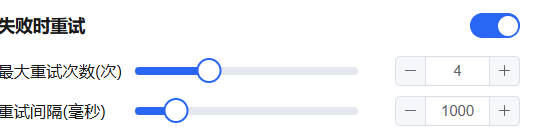
Error Retry — Automatically retry on execution failure.
- Max retries: 10
- Max retry interval: 5000 ms
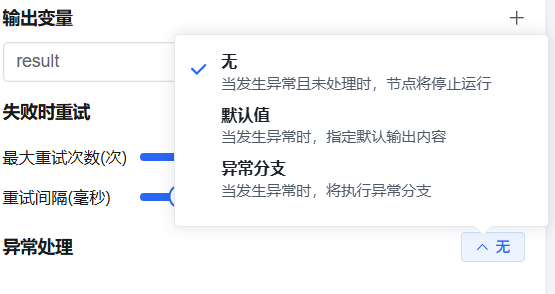
Exception Handling — Configure a fallback branch when an uncaught exception occurs, avoiding interruption of the entire workflow.
FAQ
Q: What to do when execution times out?
Check for large-data loops or inefficient algorithms. Use generators for large lists and avoid loading all data at once. Consider filtering or paginating data in upstream nodes.
Q: Output variable not recognized by downstream nodes?
Confirm: (1) the main function returns a dict/object with field names matching the output variable declarations, and (2) the output variable panel has the correct fields and types added.
Q: Can I call other nodes from within the code?
No. The code node is for pure computation only. Interactions with external services (HTTP requests, database queries) must be handled by dedicated nodes, with data passed via variables.
Q: Python or NodeJS?
- Math, regex, data structures → Python
- JSON manipulation, string templates, async logic → NodeJS
- When capabilities are similar, use whichever your team knows better.