Task Loop Node
Definition
The Task Loop node executes the same set of operations on each element in an array sequentially, until all elements are processed and results are output. Think of it as a batch processor in a workflow — typically used with array variables.
How It Works
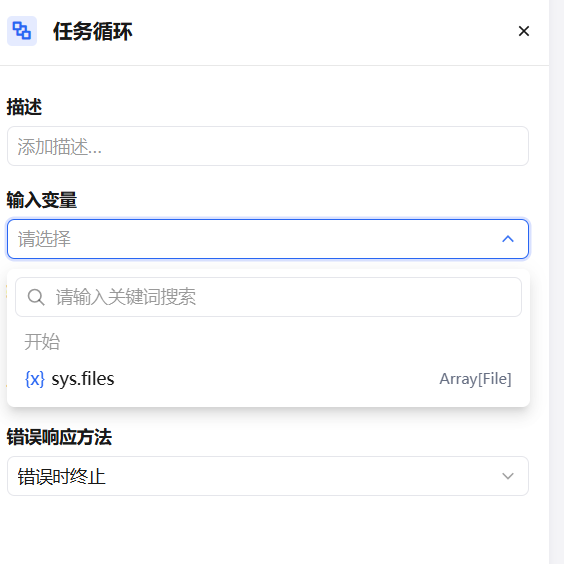
The Task Loop node accepts an array as input, passes each element one by one into an internal sub-flow for execution, and aggregates all results into a new array output for downstream nodes.
| Concept | Description |
|---|---|
| Loop Input | The array variable to iterate over; one element is taken per loop iteration |
| Loop Variable | The single element in the current iteration; can be referenced by nodes inside the sub-flow |
| Loop Output | The return value after each sub-flow execution; all results are aggregated into an array |
Any node type can be nested inside the sub-flow (Model, Code Execution, HTTP Request, etc.). Each iteration runs independently.
Typical Use Cases
Bulk Translation of Long Documents
Feeding a long article directly to an LLM node can hit the single-message token limit. Use a Document Split node to cut the article into an array of segments, then use the Task Loop node to call the model on each segment for translation. All translated segments are aggregated into the final output, bypassing the single-message length limit.
Document Split → Task Loop
                  └─ Model Node (translate one segment)
               → Merge Output Node
Batch Data Processing
For a list of records fetched from a database or API, process each record one by one — format conversion, field extraction, or validation — and collect the results into a new array for downstream use.
Multi-round Content Generation
For a list of keywords or topics, call the Model node on each one to generate summaries, titles, or descriptions, producing structured content in bulk.
Advanced Features
Parallel Execution
By default, the Task Loop processes array elements sequentially. Enabling parallel mode allows multiple elements to enter the sub-flow simultaneously, significantly improving batch processing efficiency.
The maximum parallel concurrency is 10 — meaning up to 10 tasks can run at the same time. If there are more than 10 tasks, the first 10 run simultaneously, and remaining tasks are processed as earlier ones complete.

Parallel mode is suitable when there are no data dependencies between iterations. If the sub-flow has sequential dependencies, keep serial execution.
Error Response
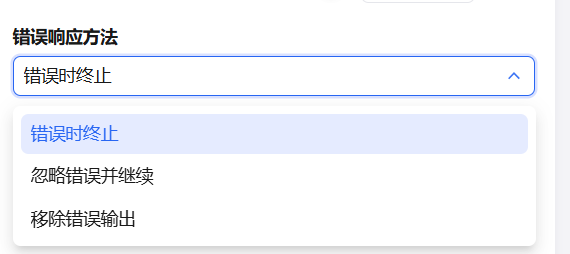
When processing a large number of tasks, errors may occur on individual elements. To prevent one error from stopping all tasks, configure an error response strategy:
- Stop on error — Terminate the loop and output an error message when an exception is detected.
- Ignore errors and continue — Skip the error and continue processing remaining elements. The output includes correct results; error outputs are null.
- Remove error outputs — Skip the error and continue processing remaining elements. The output includes only correct results; error outputs are omitted entirely.
The loop node's input and output variables correspond to each other. For example, if the input is [1, 2, 3], the output is [result-1, result-2, result-3].
- With Ignore errors and continue: error outputs become null — e.g.,
[result-1, null, result-3] - With Remove error outputs: error outputs are excluded — e.g.,
[result-1, result-3]